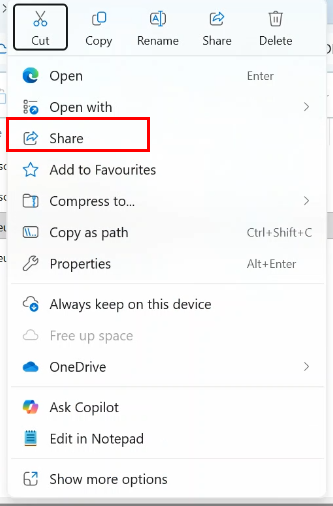
[Sharepoint] - Share File
Need to have right to share file !
Check with your admin if not sure about your rights
Web
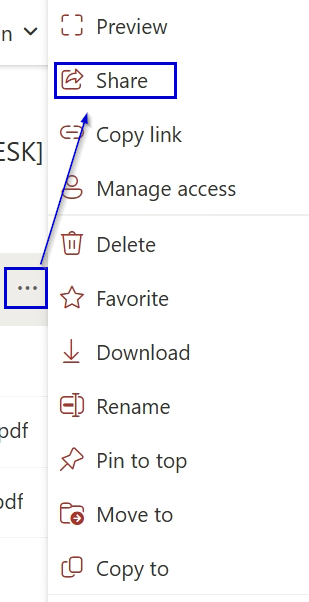
- Enter sharing informations :
- In 1 enter the guest / internal user email
- In 2 choice the access right you want to give on the document
- In 3 send the link access with your message (message is not mandatory)
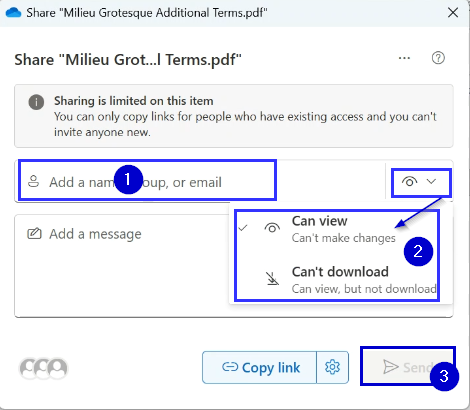
This Sharing way will send an email to the guest / internal user with an access link the file/folder you want to share
Desktop (OneDrive app)
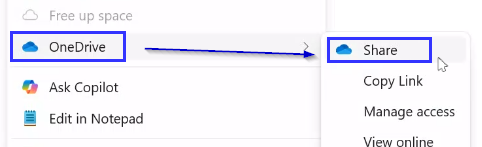
- Enter sharing informations :
- In 1 enter the guest / internal user email
- In 2 choice the access right you want to give on the document
- In 3 send the link access with your message (message is not mandatory)
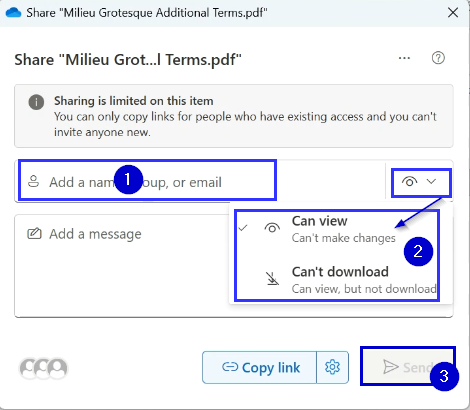
This Sharing way will send an email to the guest / internal user with an access link the file/folder you want to share
⚠️ Do not use the Windows sharing button on the menu: